Where to Download House Music for DJs in High Quality: WAV, FLAC, AIFF and MP3
Download House music for DJ sets from authorized stores, label catalogues or artist platforms that identify the release, rights holder and delivered file before payment. Buy downloadable files when you need an owned library for rekordbox and USB export; use streaming only where the service and venue workflow support it. HousePirata's real music catalogue is the direct option available on this site.
Find legal House music downloads and choose the delivered format
DJs download music from authorized download stores, record-label shops, artist-direct platforms, DJ pools with clear membership rights and catalogues operated by the distributor itself. A legitimate page identifies the track and rights holder, explains what the purchase includes and supplies a receipt. Avoid torrents, warez, file mirrors and links that redistribute commercial releases without permission. A search result saying free does not establish authorization.
Streaming and downloaded files are different performance workflows. Streaming gives access while the subscription, connection, software integration and catalogue availability remain valid. A purchased download creates a local file you can back up, analyze, prepare and export according to its license. For a planned USB set, owned local files reduce dependence on a live account or network. Streaming can still help discovery and preparation where the chosen DJ platform supports it.
Buying, downloading and streaming are not synonyms. Buying is the transaction or license grant; downloading transfers a file; streaming plays remotely without necessarily delivering a reusable master. A free authorized download may grant limited or broad use, while a paid stream may grant no exportable file. Before checkout, read the product page and terms rather than inferring rights from the button label or the extension displayed by your browser.
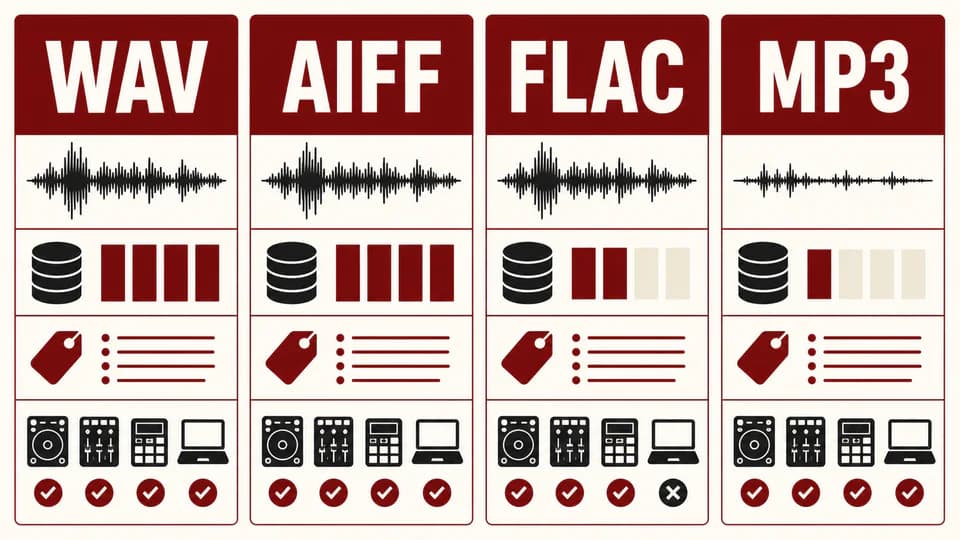
WAV and AIFF commonly store uncompressed PCM audio. FLAC compresses losslessly, which means decoded audio can reproduce the original PCM data while using less storage. MP3 is lossy and discards information to reduce size; a properly sourced 320 kbps file can be practical, but it is not lossless. None of these labels proves that the source master was good. Converting an MP3 to WAV only creates a larger file containing the already-lossy signal.
High quality means the delivered file comes from an appropriate master without clipping, accidental resampling, fake bit depth or a lossy transcode. Bit depth and sample rate describe parts of the encoding, not the artistic mix. Sixteen-bit 44.1 kHz PCM remains a valid distribution format; 24-bit can preserve more headroom in production and editing. Do not call a HousePirata release lossless, WAV or high-definition unless its catalogue record confirms that property.
Equipment compatibility depends on the exact player, firmware, file encoding and storage format. Current rekordbox documentation explicitly tells users to check the instruction manual for each DJ player, and older devices can have restrictions that newer units do not. If the booth is unknown, prepare a conservative backup library in a format verified for the target player. Never assume FLAC or AIFF works on every old deck because the desktop software can read it.
| Format | Compression | Metadata workflow | Use case |
|---|---|---|---|
| WAV | Uncompressed PCM | Support varies by tagging software and player | Broad professional interchange when verified |
| AIFF | Uncompressed PCM | Commonly used with embedded tags and artwork | Library workflow when the player supports it |
| FLAC | Lossless compression | Strong tagging with smaller storage needs | Modern compatible systems |
| MP3 320 kbps | Lossy compression | Widely tagged and relatively compact | Portable library or verified fallback |
Select DJ-ready mixes and organize BPM, key and library data
Original Mix and Extended Mix describe arrangement versions, not audio quality. An Extended Mix often gives the DJ longer beat-led phrases for blending, while an Original Mix may reach the core song more quickly. The labels are not perfectly standardized, so preview the actual structure and duration. Choose the version that fits your set design; do not buy an extended version merely because its title appears more professional.
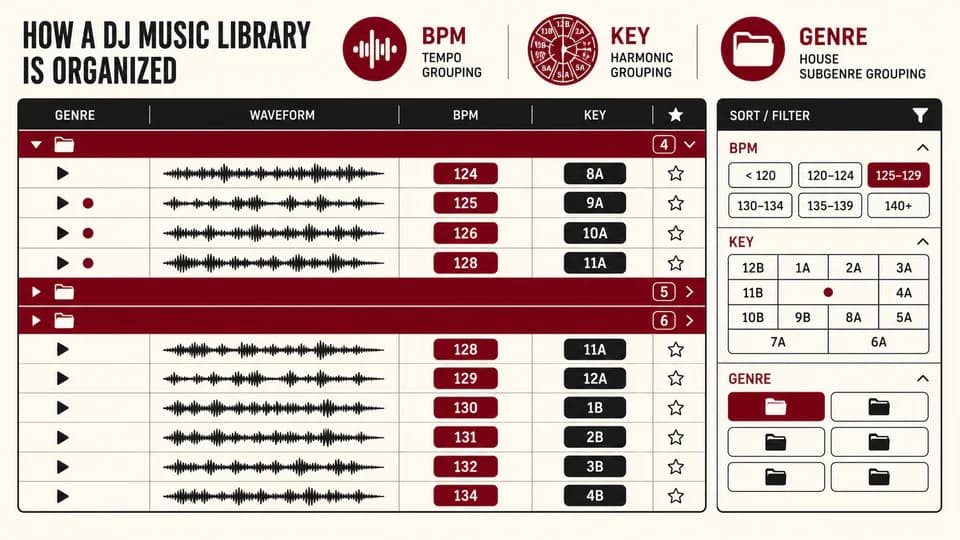
BPM and musical key help search and planning, but they are not unquestionable facts. Analysis can choose half-time, double-time or an unstable grid, and key detection can disagree on ambiguous harmony. After importing a track, verify the first downbeat, inspect grid drift across the full arrangement and correct the tempo before setting hot cues or loops. Check key by ear when harmonic mixing is important and retain the original metadata for reference.
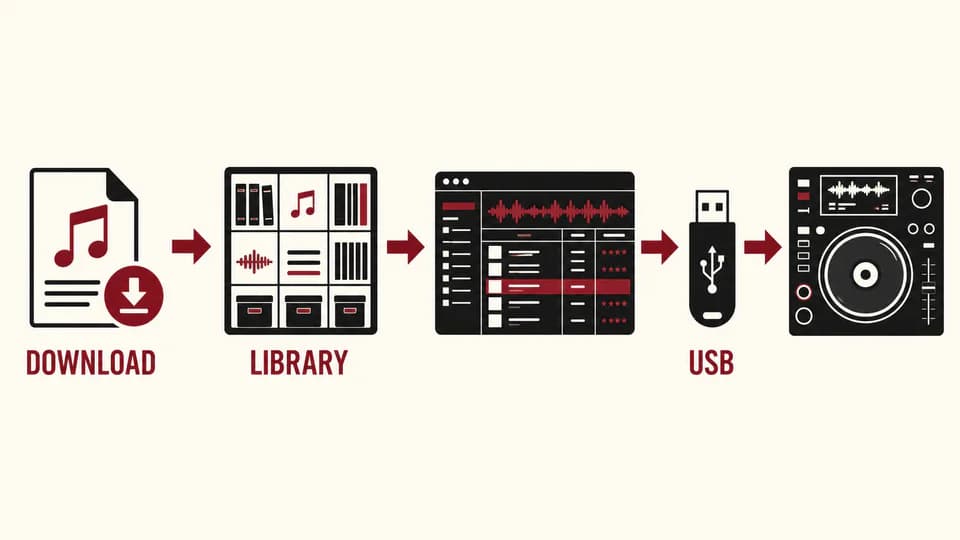
Prepare downloads in rekordbox by importing from a stable music folder rather than a temporary downloads directory. Analyze the tracks, correct grids, add cues and memory points, assign useful tags and build playlists. Then export through the supported device workflow for your software and player. The current official manual notes that music-file support must be checked against each DJ player's instructions; this is why a tested USB and a second backup matter.
Organize the archive so a future you can recover both the music and the purchase evidence. A practical path is Music/House/Label or Store/Release, with filenames that retain artist and title. Keep receipts separately, back up the original download before changing tags and avoid creating several indistinguishable copies. The performance library can use playlists, intelligent filters and tags without physically duplicating every track into a genre folder.
A useful DJ playlist combines tempo, energy, groove, vocal density and role in the set. BPM alone can put incompatible records together; genre alone can hide a transition that works. Preview the intro and outro, locate the first full bass entry, mark breaks and note whether the version contains clean phrases. Gain-match during auditioning so a loud master does not automatically appear more exciting than a dynamic one.
To find less obvious House music, browse label catalogues beyond chart order, inspect credits on releases you already play, follow remixers and producers, and search by subgenre or production characteristic rather than only by celebrity. Use wishlists or favorites before purchasing. A smaller selection of tracks you understand is more valuable in a set than a large folder downloaded because it shared a keyword.
- Verify artist, title, version and rights holder before purchase.
- Preview the full arrangement, not only the loudest excerpt.
- Confirm delivered format on the actual product page.
- Correct BPM grid and first downbeat before setting cues.
- Back up the untouched download and retain the receipt.
- Test the exported USB on the exact player model whenever possible.
Move safely from download to rekordbox, USB and the DJ player
Start by validating the file itself. Compare the extension with the format reported by trusted audio software, scan for decoding errors and inspect the waveform for obvious clipping. A spectral view can reveal a suspicious high-frequency cutoff, but it is not a perfect courtroom test because masters and encoders differ. The strongest evidence is provenance: an authorized source, a stated format, a receipt and a file whose properties match the listing.
An MP3 converted to WAV does not regain discarded information. The output may report PCM and occupy much more space, yet its spectrum and artifacts still come from the MP3. Do not use file size or extension alone to label a track lossless. If the source is uncertain, replace it with a verified purchase rather than trying to up-convert it. This prevents misleading metadata from spreading through backups and collaborator libraries.
Choose formats by workflow. Keep the original authorized download as the archive master. Use WAV, AIFF or FLAC in the main library when the store supplies it and every target tool supports the exact encoding. Prepare a widely compatible backup only after checking the player manual; high-bitrate MP3 can be practical where storage and compatibility matter. For editing or production, avoid repeated lossy encoding and work from the best verified source available.
Before buying or downloading, confirm version name, clean or explicit status where relevant, duration, delivered format, rights and re-download policy. For a House set, assess the intro, outro, phrase length, low-end balance and whether the track complements rather than duplicates current selections. If the site does not confirm WAV, FLAC, AIFF or 320 kbps, do not infer it from a generic high-quality claim.
HousePirata's conversion path is deliberately contextual rather than aggressive. Open the real music catalogue, preview what is published and inspect the available release details. The article does not invent artists, formats, track counts or discounts. If a desired file type is not confirmed, choose based on what the product record actually states or omit the purchase. The catalogue link is useful only because the destination exists and represents authorized site inventory.
Complete the workflow with two exports and a test. Keep one primary USB prepared through the correct library system and one independently checked backup. Safely eject, reconnect and confirm playlists, waveforms, cues and several full tracks. If the booth model is known, verify its manual and firmware notes. Preparation cannot guarantee every venue condition, but it removes preventable failures caused by unsupported encodings, broken files or untested storage.
| Situation | Preferred approach | Verification |
|---|---|---|
| Archive master | Keep the untouched authorized download | Receipt and file properties |
| Main library | Verified lossless or supplied high-quality file | Software and player support |
| Modern known booth | Best supplied format the exact player supports | Manual, firmware and USB test |
| Older or unknown booth | Conservative tested backup | Exact model when possible |
| Emergency backup | Separate USB with essential playlists | Reconnect and load several tracks |
| Editing | Best verified source; avoid lossy generations | Export settings and headroom |
PUT THE WORKFLOW TO USE
Explore House Music for DJs
Browse the music that is actually published in HousePirata and verify each release before acquisition.QUICK ANSWERS
Frequently asked questions
Where can I download House music for DJing?
Use authorized stores, labels, artist-direct platforms or catalogues that identify the release, rights holder, delivered file and purchase terms. HousePirata's Music page is the real catalogue on this site.
Where do professional DJs download music?
They use a mix of authorized download stores, label shops, artist platforms and legitimate DJ pools. The right source depends on genre, territory, rights and required format.
Is WAV or FLAC better for DJing?
Neither is universally better. Both can preserve lossless audio, while metadata, storage and exact player compatibility determine the practical choice.
Is 320 kbps MP3 suitable for a DJ set?
A properly sourced 320 kbps MP3 can be practical and widely compatible, but it remains lossy. Use a verified source and choose lossless when your workflow and equipment support it.
Where can I get an Extended Mix?
Buy it from an authorized release page that explicitly lists Extended Mix as a version. Preview the arrangement because naming and phrase length are not perfectly standardized.
How do I download high-quality music for rekordbox?
Purchase a verified file, archive the original, import from a stable folder, analyze and correct the grid, set cues, export to a supported USB and test it.
Can converting MP3 to WAV improve quality?
No. Conversion changes the container and size but cannot restore information discarded by MP3 encoding.
Which format should I buy for a CDJ?
Check the exact CDJ model and firmware manual. Choose a supplied format that both rekordbox and that player support, then prepare a tested fallback.
Is buying better than streaming for DJ music?
Buying downloadable files is usually more dependable for owned USB libraries and offline preparation. Streaming can support discovery or compatible performance workflows but depends on service access.
How should I organize downloads for a DJ set?
Keep an untouched archive, use stable artist-title filenames, verify BPM and key, build playlists by energy and role, store receipts and maintain a separate tested USB backup.
KEEP BUILDING
Related production guides
Kick and Bass in House: Phase, Space and Groove
Understand the relationship between house kick and bass by defining frequency roles, checking phase, shaping note lengths and using sidechain movement that protects both punch and groove.
Why Ableton House Templates Improve Production
Learn how a focused Ableton house template preserves groove decisions, removes repetitive routing and helps producers turn promising loops into polished arrangements without losing originality.
Deep House Drum Grooves: Swing, Ghost Notes and Space
Program deep house drum grooves with subtle swing, quiet ghost notes and enough negative space for bass, chords and vocals to breathe.